10-Day Free Trial — No Credit Card Needed

Stop Overpaying for Your POS System

Most POS software costs $50–$100+ per month. Solis POS gives you everything they charge for — barcode scanning, inventory, reports, multi-staff, loyalty — for just $239 AUD/year.

No credit card
Works offline
Cancel anytime
Up to 8 devices
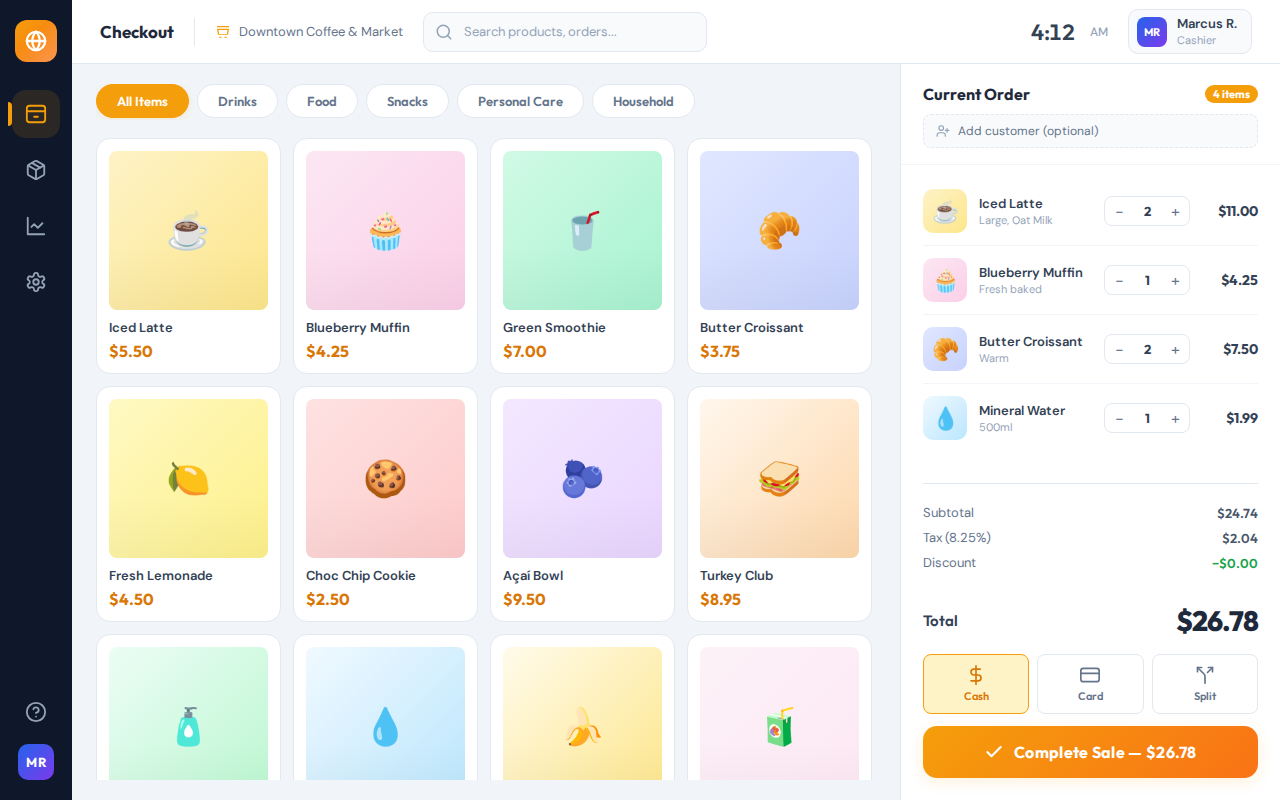
Solis OS POS Checkout Screen
Works on any device
$239
Per Year, Everything Included
<$20/mo
That's Less Than $20/Month
8
Devices at the Same Time
10 Days
Free Trial, Full Access
Built for every business that sells
Cafes
Retail & Shops
Salons & Spas
Auto & Parts
Restaurants
Supermarkets

How Much Are You Overpaying?

Other POS systems lock you into expensive monthly subscriptions. See how Solis POS compares.

Solis POS Typical Cloud POS Premium POS
Monthly cost ~$20/mo $50–$70/mo $89–$165/mo
Annual cost $239/yr $600–$840/yr $1,068–$1,980/yr
Works offline Full offline Limited Limited
Transaction fees None 2.6% + 10c 2.49% + 15c
Devices included Up to 8 1 (pay per extra) 2 (pay per extra)
Contract required None Varies Often 1–2 years
Proprietary hardware Not needed Required Required
Free trial 10 days, full access Limited features Demo only
Save up to $1,741 per year compared to premium POS systems
No per-transaction fees. No hardware lock-in. No hidden charges. Just $239/year for everything.

Everything You Need. Nothing You Don't.

No bloat, no upsells. Every feature is included from day one.

Manage from Your Phone
Add products, adjust stock, create deals, track sales, and monitor staff — all from your phone, anywhere.
Barcode Scanning
Scan with your camera or USB/Bluetooth reader. Instant product lookup and checkout.
Inventory & Alerts
Track stock in real-time. Get low stock alerts before you run out of your top sellers.
Works Offline
Internet goes down? Keep selling. Everything syncs automatically when you reconnect.
Sales Reports
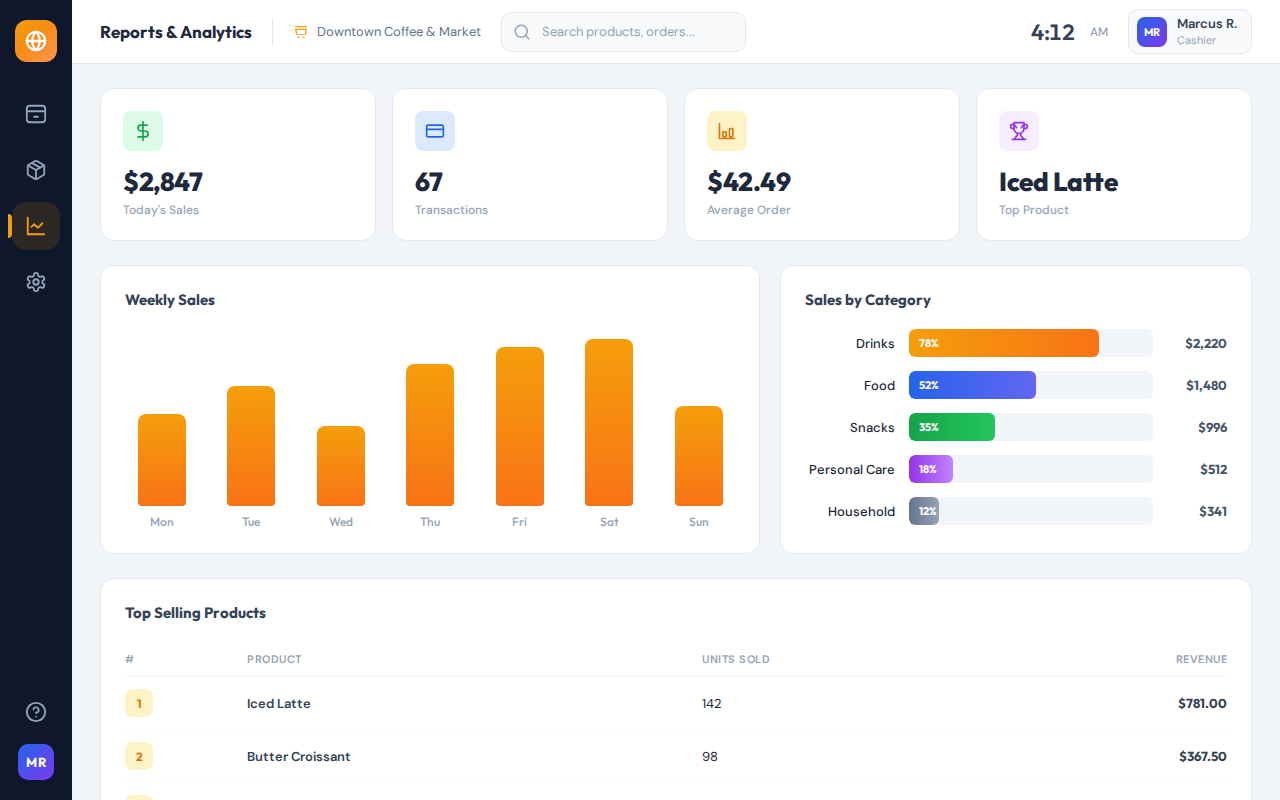
Daily, weekly, monthly breakdowns. Know your top products, peak hours, and revenue at a glance.
Multi-Staff with PINs
Each employee gets their own PIN. Track who sold what. Set cashier vs. manager permissions.
Loyalty Program
Reward repeat customers with points. Print barcode loyalty cards. Scan to earn and redeem.
Promotions & Deals
Buy-X-Get-Y, percentage off, bundle deals. Auto-applied at checkout — no manual discounting.
Receipt Printing
Thermal printer or email receipts. Add your logo and business info. Professional every time.

Designed for Speed and Simplicity

A clean interface built for real-world use. Your staff will learn it in minutes, not days.

POS Checkout Screen
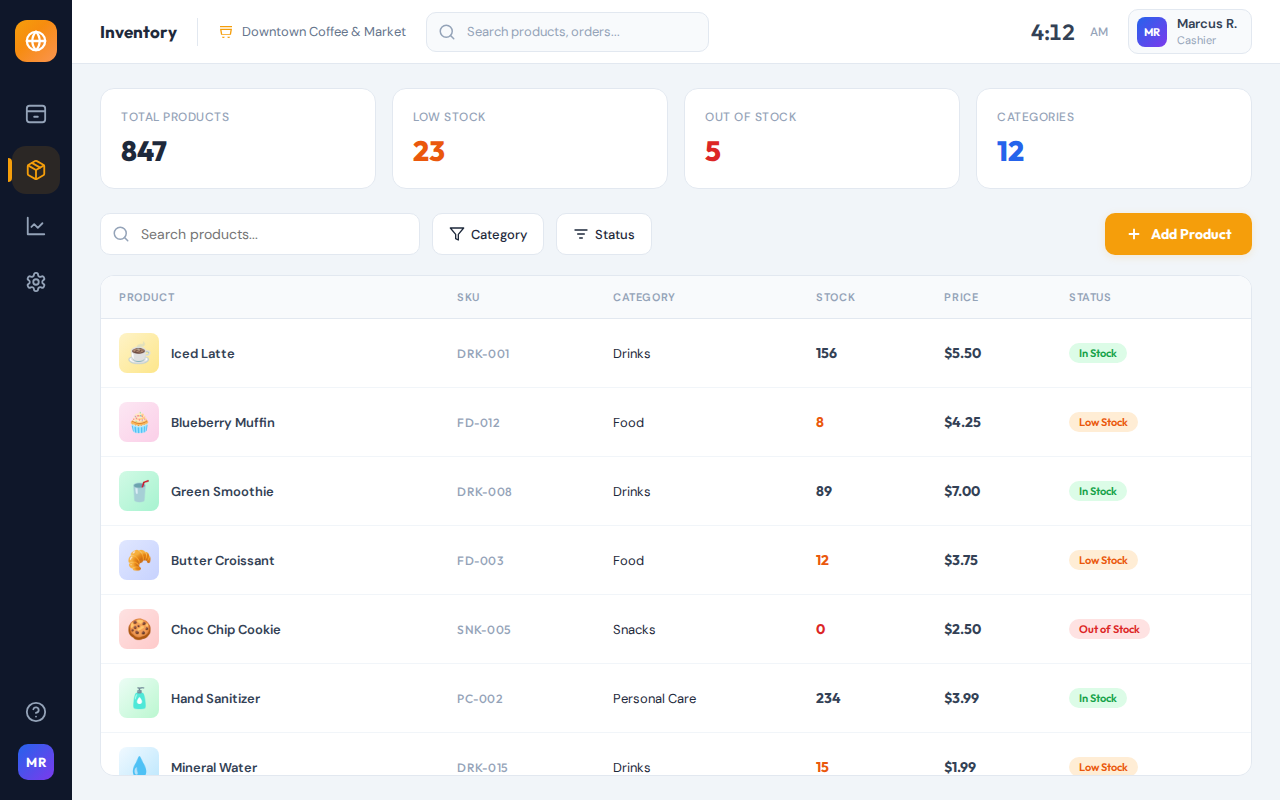
POS Inventory Management
POS Sales Reports
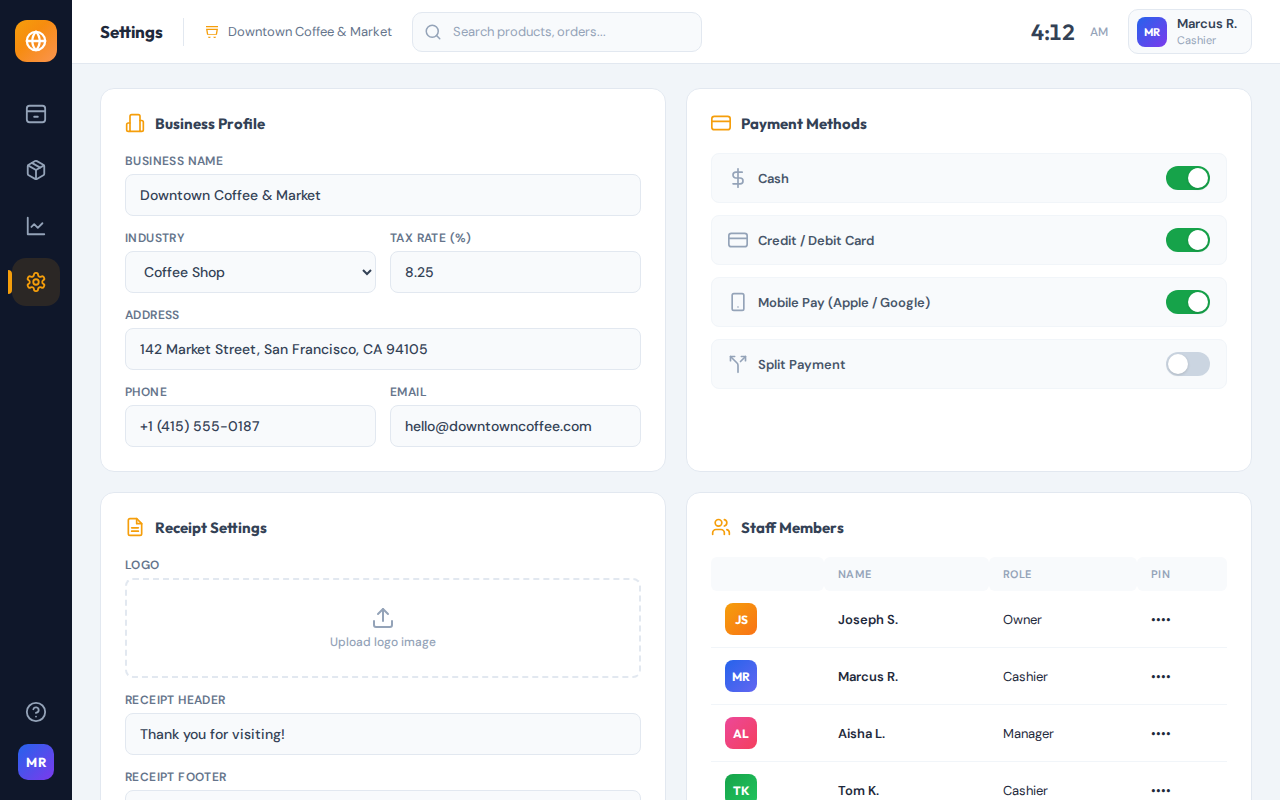
POS Settings
Checkout — Fast, touch-friendly register screen

Up and Running in 5 Minutes

1
Start Your Free Trial
Open the POS in your browser. Add your products, customize your settings. Full access for 10 days, no credit card.
2
Love It? Subscribe
Just $239 AUD/year. Secure online payment. No contracts, cancel anytime. Every feature included.
3
Install on Your Devices
Set up on iPads, Android tablets, Windows, or Mac. Up to 8 devices. All data syncs automatically.

Get Solis POS on Any Device

Solis POS works on every device with a browser. Install it in under a minute and it works just like a native app — even offline.

iPad / iPhone
Safari browser
1
Open solis-os.com/app in Safari
2
Tap the Share button (square with arrow)
3
Scroll down and tap "Add to Home Screen"
4
Tap Add — Solis POS icon appears on your home screen
Android Phone / Tablet
Chrome browser
1
Open solis-os.com/app in Chrome
2
Tap the three-dot menu (top right)
3
Tap "Install app" or "Add to Home screen"
4
Tap Install — opens like a real app, works offline
Windows PC / Laptop
Chrome or Edge browser
1
Open solis-os.com/app in Chrome or Edge
2
Click the install icon in the address bar (or menu → Install)
3
Click "Install" — adds a desktop shortcut
4
Launch from desktop — works offline, no browser needed
MacBook / iMac
Chrome or Edge browser
1
Open solis-os.com/app in Chrome or Edge
2
Click the install icon in the address bar
3
Click "Install" — appears in your Applications folder
4
Open from Launchpad or Dock — runs like a native Mac app
Any Device with a Browser
No install needed
1
Open solis-os.com/app in any modern browser
2
Sign up or log in — start using it immediately
3
No download needed — the full POS runs in your browser
4
For offline mode, install it using the steps for your device above
No app store needed. Solis POS installs directly from your browser. Works on up to 8 devices. All data syncs automatically.

One Price. Everything Included.

No tiers, no hidden fees, no upsells. One plan that includes every feature.

Try Free for 10 Days
$239
AUD / year — cancel anytime, no contracts
That's less than $20/month — save hundreds vs competitors
  • Every feature, no tiers or add-ons
  • All software updates included
  • Up to 8 devices simultaneously
  • Unlimited products & transactions
  • Full offline mode
  • Zero transaction fees
Start Your Free Trial

No credit card required — full access for 10 days

Cancel anytime. No contracts. No questions asked.

Already tried it and ready to subscribe?

Common Questions

How is it so affordable compared to other POS systems?
We don't charge per-transaction fees, don't require proprietary hardware, and don't force expensive monthly plans. Our software runs on any device you already own. That means we can price it at $239/year while others charge $50–$100+ per month for similar features.
What hardware do I need?
Any tablet, iPad, laptop, or desktop with a browser. That's it. Optionally add a barcode scanner ($30+), receipt printer ($50+), and cash drawer ($30+) for a full POS station. No proprietary hardware required — use what you already have.
Does it really work without internet?
Yes. Once installed on your device, the full POS works offline. Ring up sales, manage inventory, print receipts — all without internet. When you reconnect, everything syncs across all your devices automatically.
Can I try it before paying anything?
Absolutely. You get 10 days of full access — every feature, no limitations, no credit card needed. Just sign up and start using it immediately in your browser. If you like it, subscribe. If not, no hard feelings.
Can I use it on multiple devices at once?
Yes. Run Solis POS on up to 8 devices simultaneously — iPads, Android tablets, laptops, desktops. All data (products, sales, customers, settings) syncs automatically. Perfect for multiple checkout lanes, kitchen displays, or backroom management.
Can I manage my shop remotely from my phone?
Yes! Scan the QR code in your POS settings, save it to your home screen, and you have a full remote dashboard on your phone. Add products, adjust stock, create promotions, and track sales from anywhere — at home, on vacation, wherever.
What if I need help getting set up?
We provide email support and built-in setup guides. Most people are up and running in under 5 minutes — the interface is designed to be intuitive. No technical knowledge needed.
What happens if I cancel?
You keep using Solis POS until the end of your paid period. Your data stays on your devices. No lock-in, no penalties, no hidden cancellation fees. Cancel from your account at any time.

Ready to Stop Overpaying for Your POS?

10-day free trial. No credit card. No commitment. Full access to every feature.
Start Your Free Trial
No credit card needed
Works on any device
Cancel anytime
Try Solis POS Free 10 days, no credit card
Start Free Trial